


“Wow, look how this guy plays CS2! He instantly moves his crosshair to the enemy head, controls the weapon perfectly, and navigates the map flawlessly. He must be a rare talent at this game.”
![Funny [YELLOW] Case case cs go](https://rs.bloodycase.com/?url=cdn.bloodycase.com/cases/1475894062878822400.webp&w=370&h=336&output=webp&q=100)
![Funny [RED] Case case cs go](https://rs.bloodycase.com/?url=cdn.bloodycase.com/cases/1475893882817351680.webp&w=370&h=336&output=webp&q=100)
![Funny [PURPLE] Case case cs go](https://rs.bloodycase.com/?url=cdn.bloodycase.com/cases/1475893755763494912.webp&w=370&h=336&output=webp&q=100)
![Funny [BLUE] Case case cs go](https://rs.bloodycase.com/?url=cdn.bloodycase.com/cases/1475894282886844416.webp&w=370&h=336&output=webp&q=100)
![Funny [GREEN] Case case cs go](https://rs.bloodycase.com/?url=cdn.bloodycase.com/cases/1475894570033090560.webp&w=370&h=336&output=webp&q=100)
Friend, listen: every player, even the coolest one, once started from zero. He couldn’t kill an opponent standing right in front of him, got lost on the map, and didn’t know what the console was. Only the desire to learn to play better and practice allowed this guy to become who he is in CS2.
He made it – and you can do it too. To make the learning process more efficient for you, we at Bloodycase.com have prepared recommendations to help you approach the pro level. But don’t forget that theory is only theory. You also need constant practice.
So, here are our Counter Strike 2 tips that you can already use in your next match.
Optimize Your Settings
Before moving on to actual gameplay, pay attention to the “organizational” matters. By setting up your computer correctly, you will make it so that even this lifeless machine will help you improve your results in the game.
Basic Settings
In this shooter, advanced graphics play a secondary role, right? So why push your graphics card to the limit? Your task is to increase FPS in Counter Strike as much as possible. If in some AAA single-player game, 70-80 frames per second is the norm, in CS2, this is not enough.
Aim to raise this indicator to 100 and above. Turn off all additional effects in the settings if your PC is not powerful enough. High FPS will help you aim more accurately in dynamic situations, control spray more easily, and even see the moment the opponent peeks from behind cover or a wall a bit earlier. The difference will be just a few tenths of a second, but in a shooter like this, it is critically important.
Resolution And Aspect Ratio Setting
Clear and unambiguous CS2 pro tips on this matter are useless to look for. That’s because these aspects depend on personal preferences and how exactly you perceive the image on the screen. Look at professional players: some of them still play with a 4:3 aspect ratio, with black bars on the sides of the screen. But that doesn’t stop them from achieving the highest results.
The main recommendation is not to look for Counter Strike 2 tips related to resolution and aspect ratio settings, but to try everything yourself.
If you’re interested in, let’s say, commonly accepted recommendations regarding aspect ratio, here they are:
- 16:9. The most popular option. Provides maximum horizontal view. Suitable for most players;
- 4:3. A type that is popular among many esports players who started in CS 1.6. The image is squeezed on the sides. Player models are larger;
- 16:10. A balanced option. Something between the two types listed above.
As for screen resolution, we’ve already covered the main tip above. Choose the option that guarantees the highest FPS. If you have a powerful new computer, it’s not necessary to use minimum graphics, because your hardware will surely provide the recommended performance.
The perfect option is 150-200 FPS. After you reach these numbers, you can improve the graphics at your discretion.

Mouse Settings
The main parameters here are DPI and sensitivity. Experienced esports players who discuss how to go pro in CS2 recommend choosing a DPI of 400-800. This is the standard among professionals.
Mouse sensitivity is a strictly individual parameter. If you’re a beginner, play a few matches (for example, in deathmatch, which doesn’t affect anything) and choose the most comfortable setting for yourself.
And finally, the best option recommended by experienced players is mice with a 1000 Hz frequency. They provide perfect responsiveness for Counter-Strike.
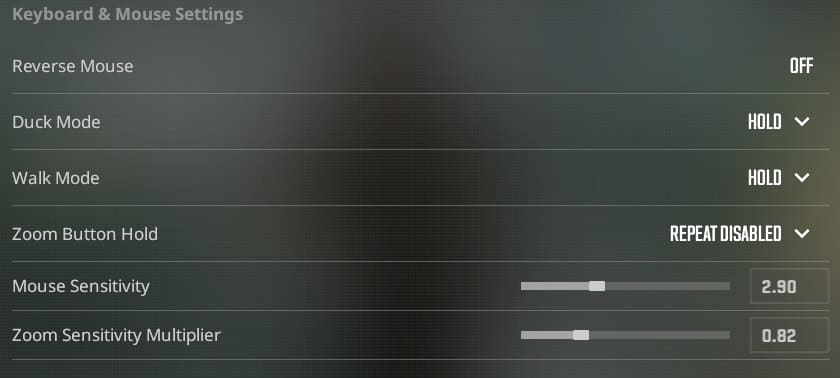
Crosshair Settings
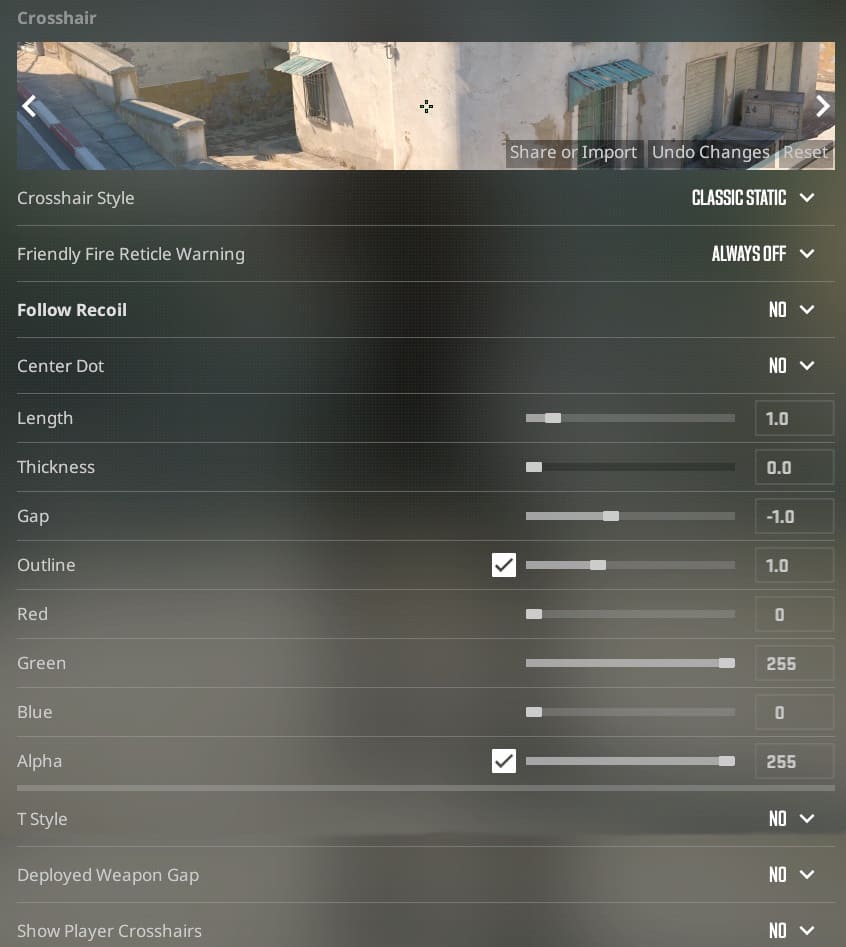
Another parameter where even the best CS2 tips may not help, as it all depends on personal preference. The main settings are the size, thickness, and color of the crosshair. Through practice, you will find the best option for yourself.
You will also have to choose between a static or dynamic crosshair. A static crosshair does not change its appearance even if you hold LMB and fire the entire AK-47 magazine. A dynamic crosshair will gradually expand, showing how recoil affects accuracy. This option appears to provide more information and seems more useful, but many players dislike the constantly “shaking” crosshair right in the center of the screen. The choice is yours.
Learn How To Move Properly In CS2
Look at the main CS2 tips related to movement in a list format.
- Use running (just press WASD) when there is no enemy nearby or when the enemy already knows your location. During this movement, you make footstep noise.
- Hold Shift (default button) to walk. The model moves slowly but silently.
- Use strafes when coming out from behind cover and walls. A strafe is a short movement. For example, if you want to peek out from behind a wall on your left and, if necessary, start shooting immediately, press the A key ONCE. Do not hold the key.
- Use strafing with crouching for prefiring. If you suspect that an enemy is waiting for you at a certain point, peek out from behind the wall by pressing not only the movement key but also CTRL (default crouch button). The fact is, an enemy waiting for you usually aims at head level. Using this trick will force the enemy to lower their aim. They will lose precious fractions of a second during which you can kill them.
If you are interested in CS2 advanced tips about movement, study bunny hopping mechanics. It is a combination of jumps that allows a player to move significantly faster across the map. However, it is challenging for a beginner to learn.
Learn How To Shoot
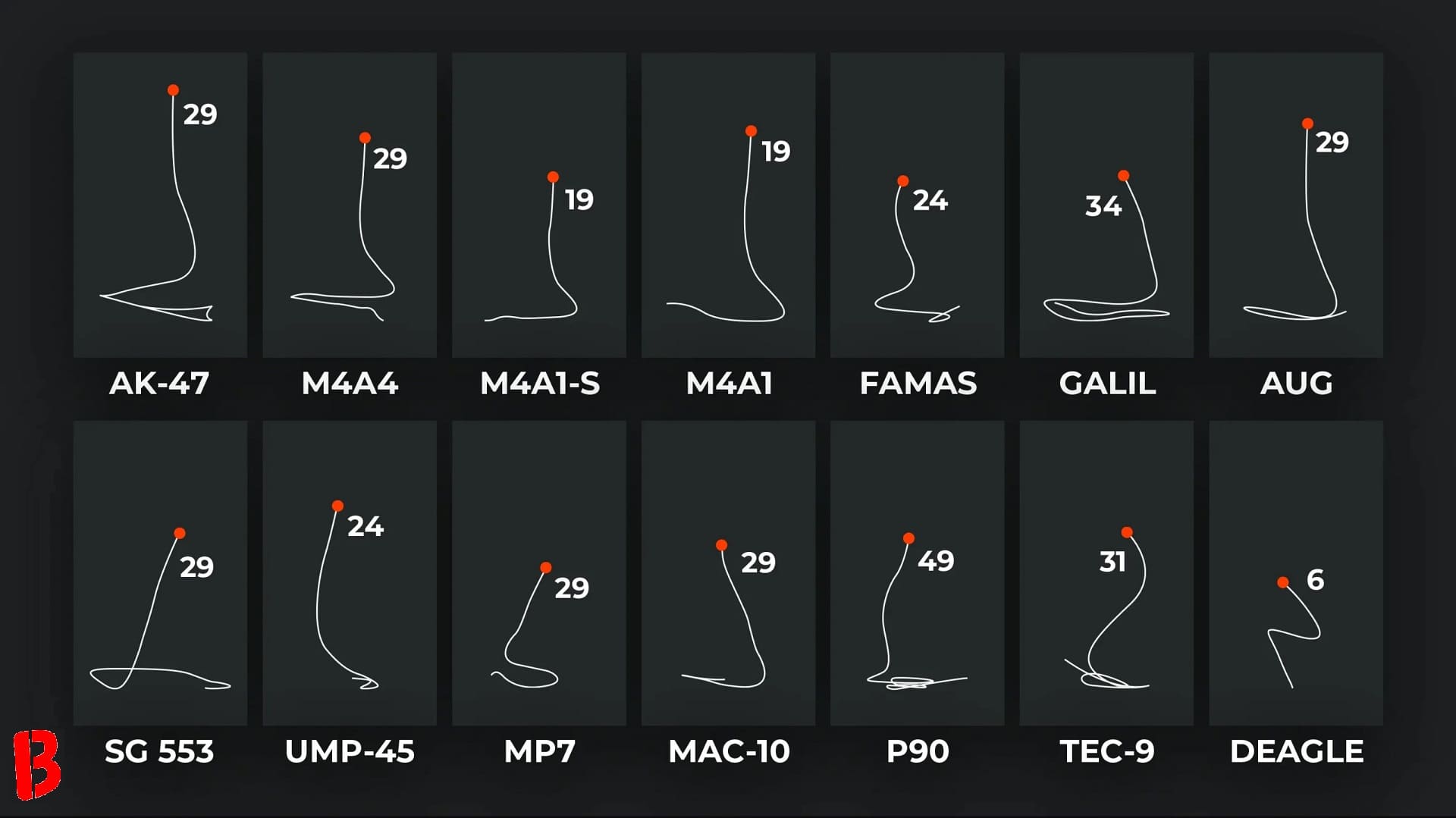
Our CS2 beginner guide could not avoid mentioning spray patterns. Remember, weapons in CS are not laser guns that shoot at the same spot even if you fire the whole magazine at once. There is a pattern. This is where your bullets will go after the first shot.
Here are examples of patterns for the most popular guns in the game: AK-47 and M4A1. Your first bullet is the lowest point. Then, due to recoil, the following bullets start rising higher, and at the end of the spray, they move to the right.
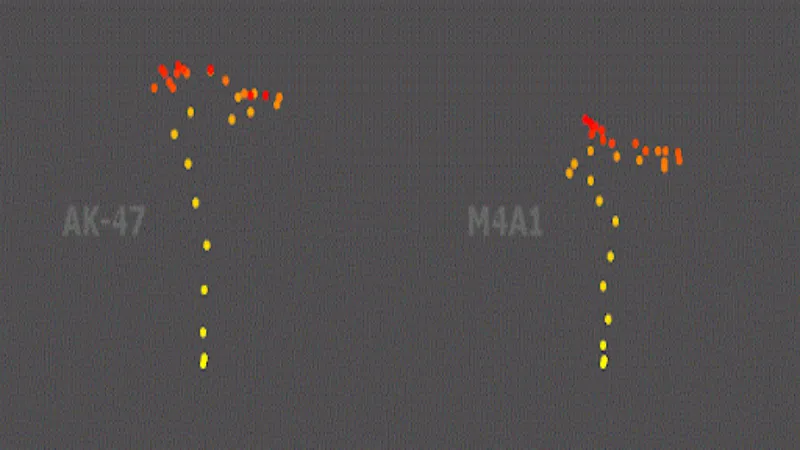
This must be taken into account when shooting an opponent with spray. The logic is simple: if, after the first bullet, the next ones start flying upwards, you need to compensate for recoil by slowly moving your mouse down, and so on. In short, the guide is to move your mouse in the opposite direction to how the points are arranged in the spray pattern. This way, you will achieve good spray control.
With pistols, it is simpler in one way but harder in another. “Simple” means that you always need to aim for the head. That is the only recommendation. It is hard because the head is the smallest part of the enemy model. But don’t worry, accuracy comes with experience. By the way, do not underestimate pistols. For example, if you add the legendary Deagle to your gear, you can take an enemy’s head off with one shot from almost across the entire map.
With the AWP, it is much easier: you need to hit the enemy’s head, chest, or stomach for getting a frag. The exception is when there is an obstacle between you and the enemy (for example, a door). This obstacle reduces damage to the enemy.
Practice Your Aiming Skills
Here are some tips for CS2 that will help you improve your aiming skills.
- Play deathmatch. It is a chaotic and dynamic mode where, after death, you immediately respawn in a random place on the map. Dozens of players can take part in this action. You can choose one weapon for the mode or a random gun after each respawn. In deathmatch, the player does not feel stress because nothing depends on the result, so this is a great way to improve your shooting skills.
- Use maps to improve your aim, for example, aim_botz, training_aim_csgo2, aim_training_cs2, fast_aim_reflex_cs2. This is a mandatory point of any list of CS2 tips for beginners. On such maps, the game sends bots toward you, and you just need to kill them. In some cases, bots stand still. A common practice among professional players is to kill 500-1000 bots before the start of the gaming day.
- Avoid long sprays if you are a beginner. Everything is logical: the longer the spray, the stronger the recoil, and the lower the chances of hitting the target. The optimal option for a new player is burst shooting. Use about 4-5 bullets, then let the weapon “rest”, so the crosshair returns to the original state.
Actually, you can do without any Counter Strike 2 tips. Millions of players did and do so. You can just play real matches and improve your skills on the go. This is also a legitimate option, why not?
Play With The Basic Arsenal
Different weapons have different levels of difficulty in the game. For example, the automatic pistol CZ75-Auto, even in the hands of a professional player, can give zero profit, which is why it is such a rare device.
Your task at the initial stages is to play using basic weapons. For terrorists, these are AK-47, SG 553, and Glock 18. For counter-terrorists, these are M4A1, AUG, and USP-S.
Beginners better not take AWP. First, it is one of the most expensive weapons in the game, and losing it will deal a severe blow to the team’s economy. Second, the cost of a miss is high. There are only five bullets in the magazine. Between each shot, there is about a second.
Better forget about machine guns completely. Although in real life this is one of the most fearsome types of weapons, in CS it serves as a tool for entertainment. Neither amateurs nor professionals use it massively. This is also why skins for machine guns are cheap.
Useless weapons for beginners also include the Scout. It is similar to AWP, but much weaker. This sniper rifle guarantees a kill only if the enemy is hit in the head.
Master Spray Patterns Of Shots Of Popular Weapons
Above, we listed the most popular and valuable types of weapons for both teams. You should learn their spray patterns first (except pistols and sniper rifles, because they have single shots and no patterns)
Watching videos about how to become a CS2 pro, in this case, is pointless. The skill to control spray is largely about muscle memory and reflexes, rather than theoretical preparation. Practice, and you will succeed.
Learn The Maps
Of course, without understanding the features of the maps, there can be no talk about effective play. You need to know that it is crucial not only to navigate the terrain but also to be ready for surprises. Each map has its own CS2 tips and tricks (for example, tricky positions and places where one player can boost another, catching you off guard).
Positions
Start learning any map with macro positions. These are prominent locations: the places where terrorists and counter-terrorists spawn, bomb sites, and the mid area.
As soon as you learn these basics, move on to smaller positions. For example, on the B site of Mirage, there are approximately 10 positions, each with its name. You need to learn them all and, of course, not only on Mirage.
The easiest way is to start a local server and run around the empty map, studying every corner. After that, you can move on to matches with real opponents.
Callouts
Callouts these are the names of positions that you must say in voice chat when necessary. One map may have 50 or more such points. But don’t be scared by this number. Over time, you will get used to it. This job will become automatic for you.
The main thing is to learn the names of the positions without mistakes. If you provide wrong information in voice chat, it may result in losing the round and quarrels between teammates.
Granades
The simplest option in this case is the use of high-explosive grenades. You just need to throw them at places where the enemy is exactly or presumably located.
The second are Molotov cocktails. This is a great way to ensure that there is no enemy in a specific place without having to check the point personally. Or, on the contrary, to be sure that the enemy is there. Besides, Molotov cocktails are especially useful for terrorists. If you throw it on the planted bomb, for 7 seconds, counter-terrorists cannot approach it at the risk of being burned.
The most difficult in this section are flashbang grenades. You need to intuitively understand how much time they take to explode. Additionally, we are already discussing team play here. One player can throw a flashbang, and the second can go out to a firefight with blinded opponents.
Smokes
Properly thrown smoke grenades are high-class in this game. If you want to know how to get better at CS2, learn how to throw the trickiest and most useful smokes.
These grenades are helpful for both teams. Terrorists can block opponents in their spots before going out to the plant. And vice versa: counter-terrorists can stop opponents from entering the site by blocking all possible approaches to the plant with smoke.
The difficulty of good smoke grenades is that you need to know literally to the pixel where to aim so that the smoke lands in the right place. This also comes with experience. Additionally, there are thousands of YouTube videos featuring tutorials on smokes for various maps.
Watch The Best Players Play
How to play Counter Strike 2 like professional players? First, watch how professionals play. After matches, at least at more or less serious tournaments, demo recordings of games become publicly available.
You can see what did not get into the official broadcast by switching between players yourself. Here, you will also see how players throw this or that smoke, control spray, and so on.
Communicate With Your Team
One of the most reliable ways to lose a match is to ignore your allies and try to play alone. The voice chat is half the success. You must say positions where enemies were spotted; points where you heard noise; the location on the map from where you were killed, or the place where the enemy you killed was. Only in this way will the whole team have a complete understanding of what is happening on the map in a particular round.
Listen To What’s Going On Around You
The entire CS series differs from many similar shooters in that sound is a crucial aspect here.
We will say right away that you should not play on speakers. You will hear the sound, but will not be able to determine its location. The received information loses its meaning entirely. Even inexpensive headphones allow you to geolocate enemy footsteps and pass information to teammates about the enemy’s location. Use this feature.
Ryan writes most of the articles on Bloodycase about the best skins, explanations of float values, spray patterns, and analyses of the settings used by professional CS2 players, among other topics. He got into this a few years ago while playing CS2 at the amateur level, and since then he’s continued to study more and more about what’s going on and how to play better.
When he’s not writing, he’s usually poring over a ton of material or arguing with friends about whether a particular skin is truly rare or just being heavily pushed. He likes playing on the terrorist side because they have the AK-47.