


Sometimes during Counter-Strike 2 gameplay, situations arise where you need to urgently leave a match, but the usual disconnection threatens penalties. This is where the ability to kick yourself through the voting system comes in handy. This method allows you to exit the game with fewer consequences compared to a regular disconnect. In this article, we’ll cover all the ways to properly use self-kicking in CS2 to avoid penalties and maintain your reputation.
![Funny [YELLOW] Case case cs go](https://rs.bloodycase.com/?url=cdn.bloodycase.com/cases/1475894062878822400.webp&w=370&h=336&output=webp&q=100)
![Funny [RED] Case case cs go](https://rs.bloodycase.com/?url=cdn.bloodycase.com/cases/1475893882817351680.webp&w=370&h=336&output=webp&q=100)
![Funny [PURPLE] Case case cs go](https://rs.bloodycase.com/?url=cdn.bloodycase.com/cases/1475893755763494912.webp&w=370&h=336&output=webp&q=100)
![Funny [BLUE] Case case cs go](https://rs.bloodycase.com/?url=cdn.bloodycase.com/cases/1475894282886844416.webp&w=370&h=336&output=webp&q=100)
![Funny [GREEN] Case case cs go](https://rs.bloodycase.com/?url=cdn.bloodycase.com/cases/1475894570033090560.webp&w=370&h=336&output=webp&q=100)
What is Self-Kicking in CS2 and Why Use It
Self-kicking is the process of initiating your own removal from a match through the built-in voting system. Unlike a regular disconnect that leads to an automatic ban, voting to kick yourself in CS2 allows you to leave the match through team voting. The system works simply: you or your teammates initiate a vote, and if the majority of the team agrees, you’re removed from the match.
This mechanism is borrowed from CS:GO, but CS2 has certain differences in implementation. The main advantage is that kicking through voting often leads to fewer penalties compared to simply abandoning the match. Valve understands that sometimes players need to leave for objective reasons.
Situations Where Self-Kicking Makes Sense
There are several legitimate reasons when players attempt to initiate a vote to kick themselves. The first category involves technical issues: lag spikes, ping jumping to 300+, or getting stuck in map geometry due to bugs. The second category includes real-life situations: urgent matters, emergency calls, or family circumstances.
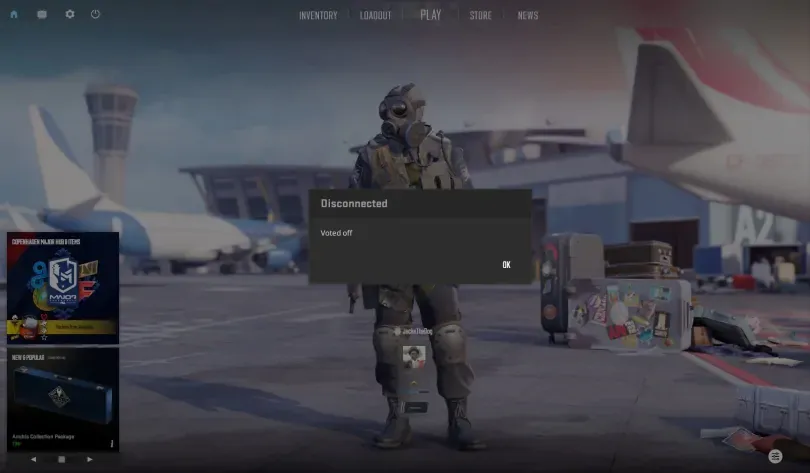
Cases of accidental wrong server connection or game mode also occur. For example, you wanted to play Competitive but accidentally joined Wingman. In such cases, using the self-kick command in CS2 can help resolve the situation faster than waiting for the round to end.
Risks and Limitations
Despite its convenience, voting to kick yourself in CS2 has its drawbacks. Valve tracks frequent removals from matches, even if it happens through voting. Frequent use of this feature can lead to temporary bans lasting 30 minutes, 2 hours, 24 hours, or even weeks. The Trust Factor system also considers such cases when selecting matches.
Reputation consequences are also worth considering. Constant match abandonment damages your profile in the eyes of other players. Additionally, in ranked games, your team is left incomplete, reducing their chances of victory. Therefore, before using the self-kick team command in CS2, assess the situation objectively.
Preparing for Self-Kicking
Be.fore applying any removal method from a match, you need to set up the developer console. This is a basic requirement for executing most commands in CS2
Enabling the Developer Console
The console in CS2 is activated through the game settings. Open the Settings menu, then go to the Game section. Find the “Enable Developer Console” option and toggle it to “Yes”. After this, the console can be opened by pressing the tilde key (~), which is located to the left of the number 1 on the keyboard.
On some keyboards, especially European ones, the tilde symbol might be used differently. If the console doesn’t open, try pressing this key. After opening the console, you’ll see a text field at the bottom of the screen where you can enter commands. To check functionality, you can use the “help” command, which will display a list of available commands.
Changing Console Key Bindings
The standard console key might be inconvenient, especially during intense gameplay moments. To change the binding, go to Settings, then to the Keyboard/Mouse section. Scroll down to the UI Keys section, where you’ll find the “Toggle Console” option.
Click on this option and press the desired key. Many players assign the console to F1 or another function key for quick access. The main thing is to choose a key that isn’t used for other important actions in the game.
How to Kick Yourself in CS2
There are several methods for removing yourself from a match in Counter-Strike 2. Each has its own application features and different effectiveness levels depending on the situation.
Through Console Command
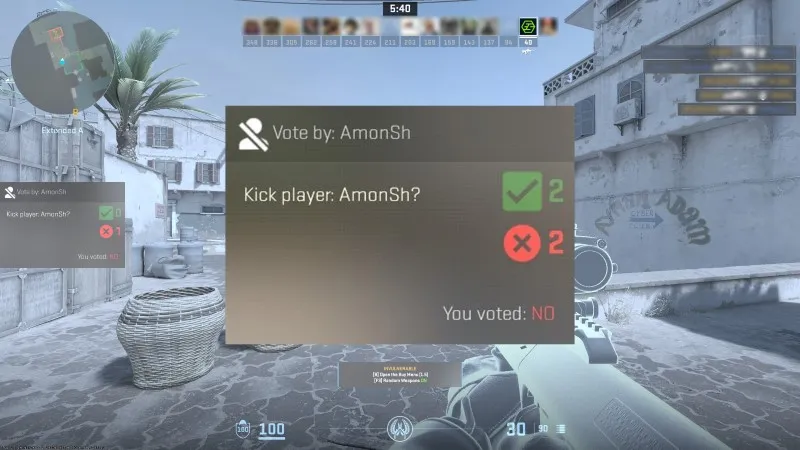
Unfortunately, there’s no direct command for self-kicking in CS2. In previous versions of the game, CS:GO had the ability to use the callvote kick command, but CS2 developers limited this functionality. Attempts to execute commands like callvote kick [your UserID] don’t work since the system doesn’t allow players to initiate voting against themselves.
Some players try to bypass this limitation through special binds or scripts, but Valve actively blocks such methods. Technically, the disconnect command allows you to leave the match, but this leads to the usual match abandonment and results in the same penalties. Therefore, kicking yourself in CS2 through commands in pure form isn’t feasible without team participation.
Initiating a Vote to Kick by Teammates
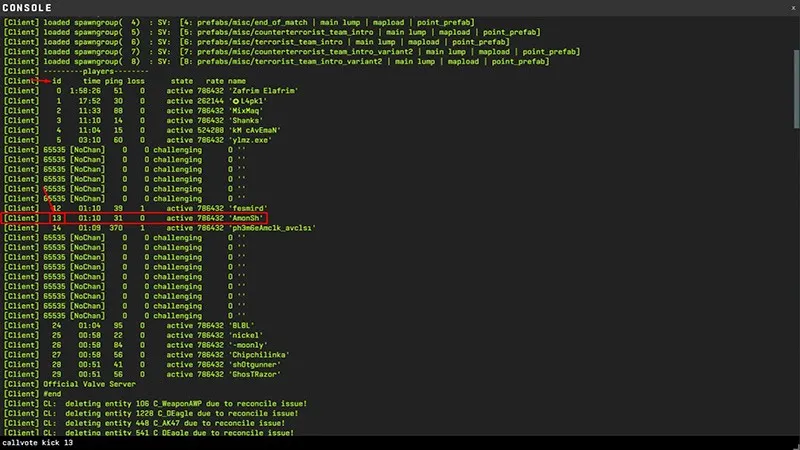
The most reliable way to kick yourself in CS2 is to ask one of your teammates to initiate the vote. This is done through the console or game menu. The teammate should open the console, press Tab to display the player list, find your nickname, and get your UserID. Then enter the command callvote kick [UserID].
An alternative method is to ask a teammate to press Escape, open the player tab, right-click on your name, and select the “Call Vote to Kick” option. After initiating the vote, all team members will see a window with a proposal to remove you. For a successful kick, you need a majority of votes.
It’s important to behave correctly when requesting a kick. Explain the reason clearly and concisely: “ping 400, need kick” or “emergency, please kick”. Don’t spam or behave toxically, otherwise the team might ignore the request or even block you in future games through the report system.
Expert Opinion from Bloodycase: Based on our experience observing thousands of CS2 matches, the most effective communication with the team happens through voice chat. Players are much more willing to help with kicks when they hear a live voice and understand the seriousness of the situation. Text messages are often ignored, especially during intense rounds. We also recommend apologizing in advance to the team and wishing them luck – this leaves a positive impression even in difficult situations.
Best Practices for Usage
Self-kicking should be used wisely to avoid damaging your account and reputation. Let’s examine the basic rules for safe use of this feature.
How to Avoid Penalties
The Valve system tracks not only the fact of kicking but also the overall pattern of your behavior in games. Avoid more than one kick per week – this significantly reduces the risk of getting a cooldown ban. The gap between kicks should be at least 5–7 days. If you already have a cooldown recently, it’s better to wait for a complete reset before the next risky exit.
Behave exemplarily in other matches. A high number of commendations from other players, victories, and MVP awards increase your Trust Factor, which can soften the consequences of retaliatory kicks. Never try to get kicked in the first rounds of a match – this is the most suspicious behavior for the system. It’s optimal to wait at least 6–5 rounds.
When It’s Better Not to Do This
There are situations when voting to kick yourself in CS2 will be a poor decision. If the match is going well and your team is winning, stay and finish the game – it’s the right choice. Even with minor technical issues, you can continue playing and help the team.
During important ranked matches, especially if the account is under stress, leaving the team can break the psychological mood of players and lead to defeat. In ranked games where every victory affects your rank, it’s better to endure inconveniences. Also, it’s not worth getting kicked due to conflict with a teammate – this is childish behavior that worsens the gaming experience for everyone.
Key Conclusions: Is It Worth Kicking Yourself in CS2?
Self-kicking in CS2 is a tool for extreme situations, not a regular way to exit games. Use it only for real technical problems or unavoidable life circumstances. Frequent use leads to penalties and reputation damage.
Always assess the situation objectively: whether it’s really impossible to continue the game, or if it’s just an inconvenience. If you decide to leave the match, do it correctly through teammates, explaining the reason. Remember that real people sit behind the screens who also want to play and get satisfaction from the game. Respect for the team always returns with a positive attitude in future matches.
Frequently Asked Questions (FAQ)
How to kick a player in CS2
To remove another player from the match, press Tab during the game to display the scoreboard. Right-click on the problematic player’s name and select “Call Vote to Kick”. Alternatively, open the console and enter callvote kick [UserID], where UserID can be found next to the nickname. For a successful kick, you need a majority of team votes. Use this feature only against griefers or those who intentionally ruin the game.
What command is used for kicking bots in CS2?
In bot games or on private servers, use the bot_kick command to remove all bots at once. To remove a specific bot, enter bot_kick [bot name], for example, bot_kick bot_dan. To remove only certain bots, use the commands bot_kick ct or bot_kick t. These commands only work on servers where you have administrator rights or in offline mode with bots.
How to kick on Faceit in CS2
On the Faceit platform, voting rules differ from official Valve servers. You can initiate voting through Faceit’s internal interface by clicking on the player’s profile in the scoreboard and selecting the appropriate option. Faceit has its own penalty system for kicks and match abandonment. Violations lead to platform bans that don’t depend on your Steam status. Always read the rules of competitive leagues or tournaments before playing.

I’m John Stevens, guy who is completely passionate about playing CS2. For me, it’s not just a hobby, it’s a way of life. I spend most of my time developing strategies, practicing, and participating in amateur championships.
Through this blog, I aim to inspire, entertain, and unite other gamers.
So join me on this incredible journey through the cs2 world. Together, we will explore the ins and outs of CS2, discuss the latest gaming news, and dive into the exciting world of eSports. My blog is created to provide insights, reviews, and thought-provoking content that will keep you coming back for more.