

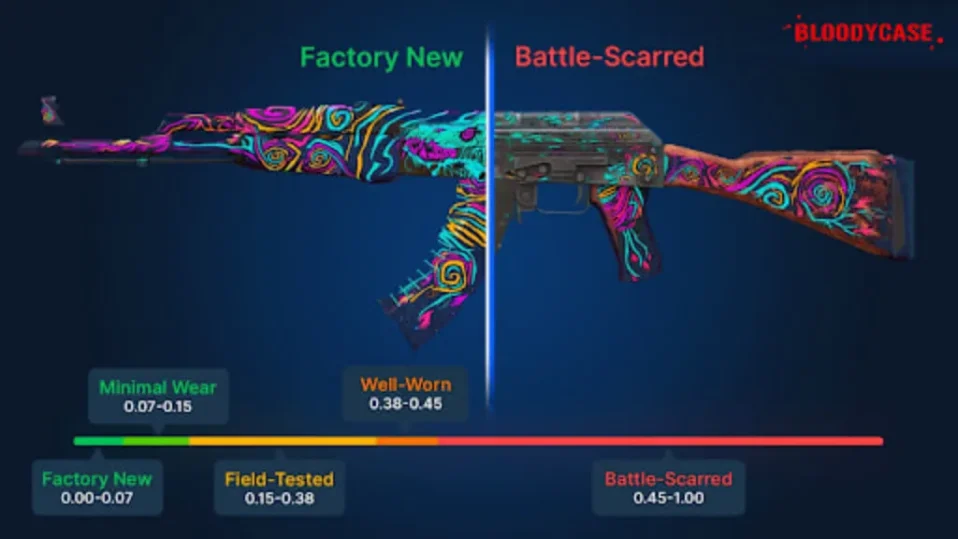
Every CS2 skin carries a hidden number that determines how worn it looks – and, more importantly, what it is worth on the market. That number is called the float value. Understanding float is one of the most practical things you can learn about the CS2 economy.
![Funny [YELLOW] Case case cs go](https://rs.bloodycase.com/?url=cdn.bloodycase.com/cases/1475894062878822400.webp&w=370&h=336&output=webp&q=100)
![Funny [RED] Case case cs go](https://rs.bloodycase.com/?url=cdn.bloodycase.com/cases/1475893882817351680.webp&w=370&h=336&output=webp&q=100)
![Funny [PURPLE] Case case cs go](https://rs.bloodycase.com/?url=cdn.bloodycase.com/cases/1475893755763494912.webp&w=370&h=336&output=webp&q=100)
![Funny [BLUE] Case case cs go](https://rs.bloodycase.com/?url=cdn.bloodycase.com/cases/1475894282886844416.webp&w=370&h=336&output=webp&q=100)
![Funny [GREEN] Case case cs go](https://rs.bloodycase.com/?url=cdn.bloodycase.com/cases/1475894570033090560.webp&w=370&h=336&output=webp&q=100)
This guide covers everything: what float value is, how wear levels work, why float affects price the way it does, how to check it before any trade, and what edge cases like float extremes mean for collectors. All information is current for CS2 in 2026.
What is Float Value in CS2?
Float value is a permanent decimal number between 0.00 and 1.00 that is assigned to a skin the moment it is generated – either from opening a case, receiving a drop, or being created through the Steam Workshop. The closer the number is to 0, the cleaner and newer the skin looks. The closer it is to 1, the more worn and damaged it appears.
A few fundamental rules about float value:
- Once assigned, the float value of a skin never changes. No amount of gameplay, sticker applications, name tags, or charm attachments will alter it.
- Two skins of the exact same type can have completely different float values and therefore look noticeably different from each other, even within the same wear category.
- The Steam inventory shows only the wear category label (Factory New, Field-Tested, etc.), not the exact float number. To see the precise value you need to inspect the skin or use a third-party tool – more on that later.
- Not all skins can exist across the full 0.00–1.00 spectrum. Valve defines a minimum and maximum float cap for each skin. For example, some skins cannot exist as Factory New because their minimum float starts at 0.07 or higher.
CS2 Wear Levels and Float Ranges
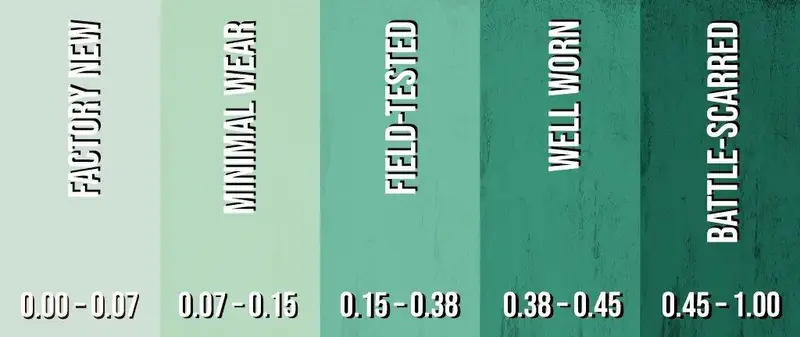
CS2 groups float values into five wear categories. The category label is what you see in the Steam market and inventory. Here is a full breakdown:
| Exterior | Float Range | Abbrev. | Visual Characteristics |
| Factory New | 0.00 – 0.07 | FN | Glossy finish, virtually no scratches or dark patches |
| Minimal Wear | 0.07 – 0.15 | MW | Minor edge marks, paint surface over 90% intact |
| Field-Tested | 0.15 – 0.38 | FT | Visible wear on corners and sides, slight colour fade |
| Well-Worn | 0.38 – 0.45 | WW | Clear scratches, muted colours, patchy surface |
| Battle-Scarred | 0.45 – 1.00 | BS | Heavy scuffing, dark stains, possible pattern gaps |
Factory New (FN)
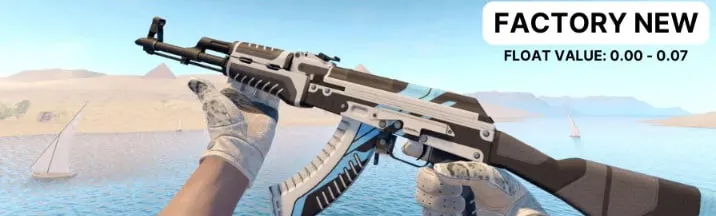
The cleanest tier. Factory New skins have virtually no visible damage – the finish is glossy, colours are vivid, and the surface is free of scratches. These are the most sought-after and typically the most expensive versions of any skin. Even within this tier, there is a significant price gap: a 0.001 float FN and a 0.068 float FN may look nearly identical in-game, yet the lower one can sell for considerably more among collectors.
Minimal Wear (MW)
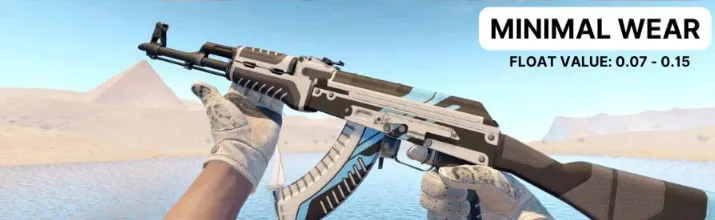
Minimal Wear is the sweet spot for most buyers. The skin retains nearly all of its visual cs2 skins quality – only faint edge marks or minor surface imperfections are present, often invisible in fast-paced gameplay. MW skins are noticeably cheaper than FN while looking almost identical in practice. For players who want a clean skin without paying the Factory New premium, Minimal Wear is the most cost-effective choice.
Field-Tested (FT)
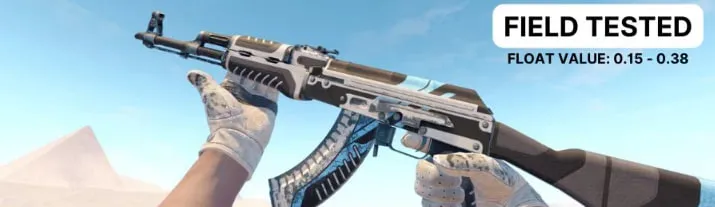
Field-Tested is the most varied tier. The float range spans from 0.15 to 0.38, which means a 0.151 FT and a 0.379 FT can look completely different from each other. Always check the exact float before purchasing a Field-Tested skin – especially on detailed designs like the AK-47 | Redline or AWP | Asiimov, where wear patterns vary dramatically within the tier. FT offers a solid balance of acceptable appearance and affordability.
Well-Worn (WW)
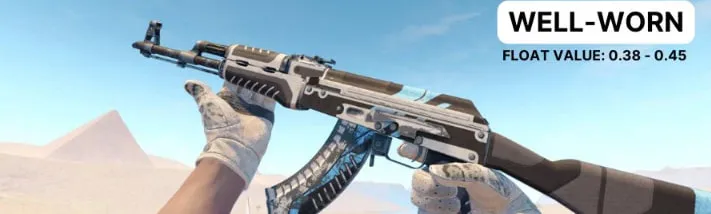
Well-Worn skins show clear scratches, reduced surface gloss, and muted colours. The visual degradation is noticeable but not extreme. For simple geometric or monochromatic skins, WW can still look decent – the wear mainly affects tone rather than design integrity. The price difference between FT and WW is often smaller than between MW and FT, which makes WW an underrated value pick on certain skin types.
Battle-Scarred (BS)
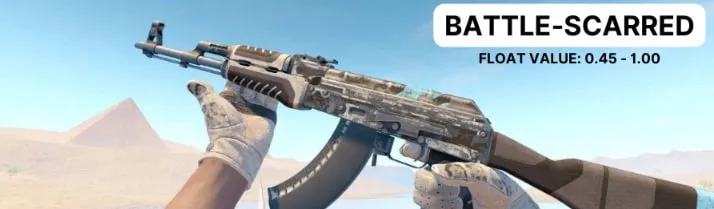
Battle-Scarred is the most worn tier and the cheapest by default. Scratches, dark stains, and pattern disruption are all clearly visible. However, BS is not without its appeal: certain skins look aesthetically interesting at high wear – camouflage patterns, metallic finishes, and skins where the design evolves with damage (such as the AWP | Asiimov) can be desirable in BS conditions. Additionally, skins with float values near 0.999 are exceptionally rare and can carry collector premiums despite their worn appearance.
Not Every CS2 Skin Exists in Every Wear Category
This is one of the most commonly overlooked facts about float values. Valve defines a minimum and maximum float cap for each skin individually. As a result:
- Some skins cannot be Factory New: If a skin minimum float starts at 0.07 or above, it can never appear in Factory New condition – not through cases, not on the market.
- Some skins cannot be Battle-Scarred: If a skin maximum float cap is below 0.45, it will never reach Battle-Scarred, regardless of how many cases are opened.
- This creates natural rarity: When a skin float cap limits its availability in a popular tier, surviving examples of that tier become genuinely scarce and command higher prices. This is separate from the float value itself – it is about supply.
Before assuming a skin exists in a particular condition, check its float cap. Tools like CS2 float checkers and community databases list the min/max float for most skins.
How Float Value Affects the Price of CS2 Skins
Float is an important pricing factor, but it is not the only one. The table below shows the approximate weight of each factor in determining a skin market value:
| Factor | Price Impact | Why It Matters | Example |
| Float Value | ~35% | Determines visual condition and perceived skin quality | FN 0.002 vs 0.068 Karambit – same tier, very different price |
| Rarity | ~30% | Lower supply drives long-term demand and collector value | Covert-tier skins vs. Consumer-grade from the same case |
| Pattern / Seed | ~20% | Unique finishes command collector premiums | Blue-gem AK-47 #661 or a full-fade Butterfly Knife |
| Stickers & Tags | ~15% | Rare tournament stickers or legacy nametags add desirability | Katowice 2014 Holo sticker on an AWP Dragon Lore |
A few things worth understanding about this relationship:
- Float and wear category are not the same thing. Two skins in the same wear category can have very different prices based on their exact float. A 0.070 Minimal Wear and a 0.149 Minimal Wear are both MW, but the former may be significantly more valuable.
- The wear level does not always scale linearly with price. A Factory New skin is not always 30–50% more expensive than its Field-Tested version – on some rare skins the gap is 500% or more, while on common skins the difference is minimal.
- Skins with the StatTrak™ counter display kill counts and are consistently more expensive than their standard versions at any float level. The StatTrak premium typically ranges from 30% to over 100% depending on skin rarity.
- Pattern seed matters independently of float. Skins like the Karambit | Case Hardened or AK-47 | Case Hardened have pattern variations (seeds) where certain combinations – particularly blue gem patterns – are worth many times more than the same skin with an average pattern, regardless of float.
Float Extremes in CS2
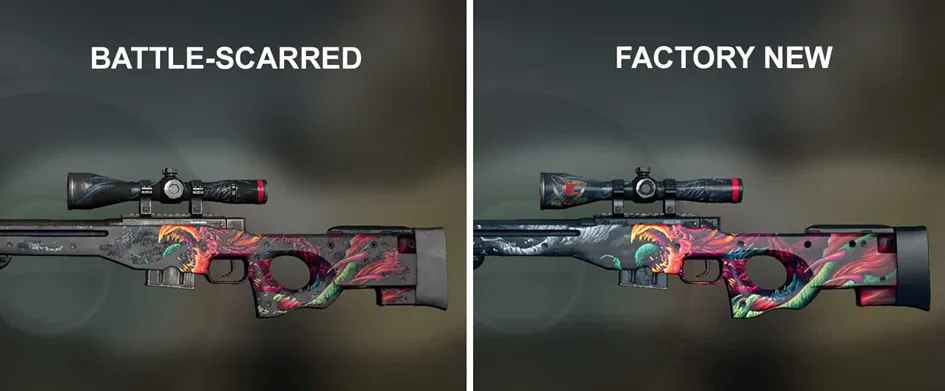
Ultra-Low Floats
Within any wear tier, the lowest possible float values are the rarest and most collectible. A skin with a float of 0.0000000001 is extraordinarily uncommon – the probability of generating such a value from a case opening is vanishingly small. For high-demand skins like knives, AWPs, and gloves, including some of the best awp skins cs2 players and collectors actively seek, ultra-low float examples command significant collector premiums that can far exceed their standard market price.
One of the most extreme known examples is the M4A4 | Howl with a float of 0.00000000010431 – widely considered one of the rarest float values ever recorded. The M249 | Gator Mesh, a skin from the Safehouse Collection, holds another record with a float of 0.000000000899658 and has reportedly changed hands for around $100,000.
Ultra-High Floats
On the opposite end, floats approaching 1.0000 within the Battle-Scarred tier are also extremely rare and collectible. The highest known float in CS2 is 0.9999863283634186 for a P250 | Sand Dune. Similarly, an AK-47 | Asiimov with a float of 0.99199 has sold for approximately $1,000 – while standard BS versions of the same skin are available for around $40.
The appeal of ultra-high floats is simpler: they are statistical anomalies. In a game where millions of cases have been opened, a float this close to the maximum is genuinely singular.
Special Float Numbers
Some traders specifically target floats with repeating or milestone numbers – 0.25000…, 0.50000…, 0.75000… – treating them as collectible due to their numerical rarity. Getting such a precise value is comparable to winning a lottery, and these skins tend to sell at a premium in collector circles.
How to Check Float Value in CS2
There are three reliable methods for checking the exact float of a skin, each suited to a different situation.
In-Game Inspection (Your Own Inventory)
This is the most direct method for skins you already own:
- Step 1: Open CS2 and navigate to your Inventory from the main menu.
- Step 2: Right-click the skin you want to inspect and select Inspect.
- Step 3: While in the inspection view, click the information icon (i) in the lower-left corner of the screen.
- Step 4: The exact float value will be displayed alongside the wear category, pattern index, and other skin details.
Steam Market and Inspect Links (Before Buying)
When browsing the Steam Community Market or third-party marketplaces, most listings include an Inspect in Game button. Clicking it launches CS2 and opens the skin for inspection, giving you access to the same float data without owning the item. Use this before committing to any significant purchase to verify the exact float matches what the seller is advertising.
Browser Extensions and Online Float Checkers
For faster lookups without launching the game, two tools are widely used:
Steam Inventory Helper
A browser extension for Google Chrome that automatically overlays float values, price estimates, and pattern data directly onto Steam inventory and market pages. It removes the need to inspect each skin individually.
Online float checker
Various CS2 community sites allow you to paste an item inspect link and instantly retrieve its float value, pattern seed, and wear category. These are especially useful when evaluating multiple items quickly or when you cannot run CS2 at the time.
Buying Tips for Float-Based Trades
Understanding float is one thing – applying it to make smarter purchases is another. Here are practical guidelines:
- Always inspect before buying a skin. Never purchase a Field-Tested or Battle-Scarred skin without checking the exact float. Two skins in the same category can look dramatically different.
- Compare within the tier: A FT skin at 0.151 float is often visually comparable to a Minimal Wear skin at 0.148 – and significantly cheaper. If appearance is your priority rather than the label, hunting within the bottom of a lower tier can save money.
- The visual difference between a 0.003 float and a 0.010 float is usually invisible in gameplay. Paying a 40% premium for marginally lower float is rarely justified unless you are a serious collector.
- On Case Hardened, Doppler, Fade, and Marble Fade skins, the pattern seed matters as much as float. Research which seeds are considered desirable before paying above-market prices.
- Do not dismiss BS skins automatically. High-float extremes, unique wear patterns, and skins where the aged look is aesthetically pleasing can all be smart purchases – especially if the market has not priced them accordingly.
- When evaluating a StatTrak skin, the float premium adds on top of the StatTrak premium. Extremely low-float StatTrak versions of popular skins can reach multiples of their standard counterparts.
Float Supply Trends in 2026
The distribution of float values in circulation is not static. A few patterns are worth knowing for anyone active in the CS2 skin market:
- Factory New and ultra-low float skins from discontinued or older cases are not being replenished, causing supply to contract as collectors hold onto them and driving prices upward over time.
- A new case release triggers an initial surge of openings that floods the market with all float values, temporarily lowering prices across wear tiers until supply stabilises within weeks.
- Skins with holographic, metallic or glossy finishes such as Doppler and Gamma Doppler hide wear far better than matte or hydrographic designs, allowing a Field-Tested Doppler knife to look nearly identical to its Minimal Wear counterpart and shifting relative demand.
- Collectors rarely sell Factory New items, especially knives and rare rifles, so the active market supply of FN skins remains smaller than the total existing stock and pushes prices higher than float value alone would suggest.
Frequently Asked Questions
What is float value in CS2?
Float value is a permanent decimal number between 0.00 and 1.00 assigned to each CS2 skin at the moment it is generated. It reflects how worn the skin looks: values close to 0 indicate a clean, near-pristine appearance, while values close to 1 indicate heavy wear and visible damage. Float value is one of the primary factors affecting a skin market price.
Can float value change over time?
No. Float value is fixed permanently at the moment a skin is created and cannot be altered by any in-game action – including applying or removing stickers, adding charms, renaming the item, or using it in matches. The only number that matters is the one the skin was generated with.
Does a lower float always mean a higher price?
Generally yes, but not universally. Within the same skin type and wear category, lower float values tend to command higher prices. However, rarity, pattern seed, StatTrak status, sticker value, and overall demand for the skin can outweigh float as a pricing factor. Some Battle-Scarred skins with float values near 1.0 sell for more than their Factory New counterparts precisely because of how rare such extreme values are.
Can two skins in the same wear category look different?
Yes, and significantly so. Wear categories cover a range of float values, not a single point. Two Field-Tested skins – one at 0.151 and one at 0.379 – may look quite different despite sharing the same category label. This is especially noticeable on skins with detailed designs or large paint surfaces. Always check the exact float, not just the category.
Why can some skins not be Factory New or Battle-Scarred?
Valve assigns each skin a minimum and maximum float cap. If a skin minimum float is above 0.07, it cannot exist as Factory New. If its maximum float is below 0.45, it cannot exist as Battle-Scarred. These caps are fixed and create natural rarity within specific wear tiers for those skins.
What is a good float value to aim for?
It depends on your goal. For pure appearance, Factory New (0.00–0.07) or Minimal Wear (0.07–0.15) are the cleanest options. For best price-to-quality ratio, Minimal Wear or low-end Field-Tested (0.15–0.20) often offer the most value. For collecting, ultra-low floats near 0.0000 or ultra-high floats near 0.9999 carry the most prestige regardless of visual quality.

I’m John Stevens, guy who is completely passionate about playing CS2. For me, it’s not just a hobby, it’s a way of life. I spend most of my time developing strategies, practicing, and participating in amateur championships.
Through this blog, I aim to inspire, entertain, and unite other gamers.
So join me on this incredible journey through the cs2 world. Together, we will explore the ins and outs of CS2, discuss the latest gaming news, and dive into the exciting world of eSports. My blog is created to provide insights, reviews, and thought-provoking content that will keep you coming back for more.